Products

SENSCOPE (SOFTWARE)

Many factors need to be considered to evaluate the health of a building or a bridge. Temperature, strain, tilt, vibration and even wind speed should be included in the inspection. Only checking the value stored in the server is far from a convenient or efficient way for monitoring the structural health. A good sensor network should have good
software to visualize and help analyze the collected data. Therefore, team developed multi- functional and easy-to use software to achieve this goal: SenScope.
SenScope is a software package designed for SenSpot and SeniMax system, conducting both real-time monitoring and long- term structural health diagnosis. SenScope is capable of converting large volumes of data into specific structural diagnostics information. The information generated by SenScope facilitates decision- making and accelerates the course of action for maintenance/repair.


Inquiry Now Download Product PDF

Many factors need to be considered to evaluate the health of a building or a bridge. Temperature, strain, tilt, vibration and even wind speed should be included in the inspection. Only checking the value stored in the server is far from a convenient or efficient way for monitoring the structural health. A good sensor network should have good
software to visualize and help analyze the collected data. Therefore, team developed multi- functional and easy-to use software to achieve this goal: SenScope.
SenScope is a software package designed for SenSpot and SeniMax system, conducting both real-time monitoring and long- term structural health diagnosis. SenScope is capable of converting large volumes of data into specific structural diagnostics information. The information generated by SenScope facilitates decision- making and accelerates the course of action for maintenance/repair.
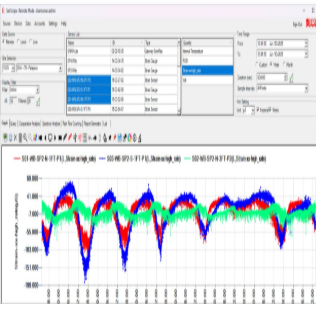
  • Visualizing data: SenScope shows the data from the remote server or the local SenSpot/SeniMax in a user- friendly working panel.
  • Automated alert generation and notification: When the measured quantity exceeds the threshold, SenScope automatically generates alert in the system and notify the user with email or text messages.
  • Data Processing Service: SenScope shows the statistical and spectrum properties of selected data. Also show the relationship between two different quantities.
  • Report Automation: SenScope exports the data of several SenSpot sensors in the form of images and spreadsheets according to user’s need.
  • Data Hosting: SenScope stores data in ’s secured cloud servers and backed up periodically. Datacan be accessed using Secure Sockets Layer (SSL) from anywhere. Data can be exported to Excel, TXT, CSV, and XML formats.
  • Air Update / Remote Configuration (advanced function): Modify the setting of SenSpot sensors (like transmission interval, local address etc.). Some limits may apply.
  • Secure internet-based interface: Using a secure SSL connection, each user can connect to a highly secure cloud database. The database can also be hosted on the user’s local servers if needed.
  • Visualizing Data : Plot the data with respect to time. The data source can be either real-time data collected from SenSpot sensors or archived data from the remote server.

  • Communication with SenSpot sensors and SeniMax gateway :
    In the Local/Live mode: 
    Show the raw data transmitted from SenSpot sensors. Configure the SenSpot sensors and the SeniMax with Air Update.
    In the Remote mode:
    Configure the SenSpot sensors through the server with Remote Configuration.

  • Data Filter: Use filters to process data before plotting them:  
    Filtering the graphs (smoothing) Extracting the trends;
    Removing the trends ;
    Removing the outliers ;
    Showing the spikes (transients, e.g. caused by passing trucks);
    Down-sampling of data;
    Modifying chart formats, types, saving and exporting graphs.

  • Comparative Analysis: Use two quantities as x and y axis and plot the data. Show the relationship between them and how the relationship changes over time (time change is shown with color change).

  • Spectrum Analysis : Use Fast-Fourier-Transformation to process a period of data and show the natural frequency of the structure.

  • Statistical Analysis: Show the statistical properties of the readings of a single or a group of SenSpot sensors (e.g., maximum, minimum, median, standard deviation in a time range).

  • Alert Generation
    Immediate Alert Services: Facilitate detection of critical failures when immediate action is needed. Alerts are delivered through text messages and email notifications.

    Regular Alert Services: Facilitate detection of non-critical failures when immediate action is not needed. Emails with detected alerts are sent regularly (daily, weekly, or monthly).

    Types of Alerts: Threshold-based alerts, regression-based alerts, disconnection alerts (communication errors).

  • Report Automation: Export the data of a set of SenSpot sensors. Data can be exported in Excel, TXT, CSV, and XML formats. Additional formats can be added if needed.